Associate Data Practitioner Exam
Your company has developed a website that allows users to upload and share video files. These files are most frequently accessed and shared when they are initially uploaded. Over time, the files are accessed and shared less frequently, although some old video files may remain very popular. You need to design a storage system that is simple and cost-effective. What should you do?
Create a single-region bucket with Autoclass enabled.
Create a single-region bucket. Configure a Cloud Scheduler job that runs every 24 hours and changes the storage class based on upload date.
Create a single-region bucket with custom Object Lifecycle Management policies based on upload date.
Create a single-region bucket with Archive as the default storage class.
You recently inherited a task for managing Dataflow streaming pipelines in your organization and noticed that proper access had not been provisioned to you. You need to request a Google-provided IAM role so you can restart the pipelines. You need to follow the principle of least privilege. What should you do?
Request the Dataflow Developer role.
Request the Dataflow Viewer role.
Request the Dataflow Worker role.
Request the Dataflow Admin role.
You need to create a new data pipeline. You want a serverless solution that meets the following requirements: • Data is streamed from Pub/Sub and is processed in real-time. • Data is transformed before being stored. • Data is stored in a location that will allow it to be analyzed with SQL using Looker.
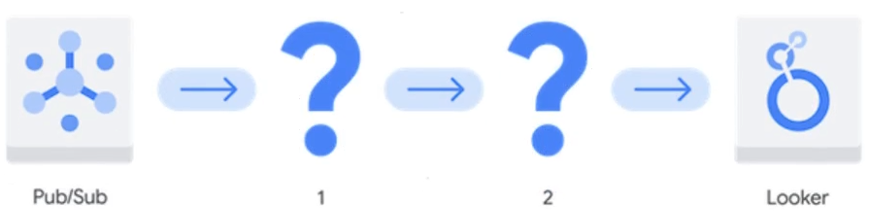
Which Google Cloud services should you recommend for the pipeline?
- Dataproc Serverless 2. Bigtable
- Cloud Composer 2. Cloud SQL for MySQL
- BigQuery 2. Analytics Hub
- Dataflow 2. BigQuery
Your team wants to create a monthly report to analyze inventory data that is updated daily. You need to aggregate the inventory counts by using only the most recent month of data, and save the results to be used in a Looker Studio dashboard. What should you do?
Create a materialized view in BigQuery that uses the SUM( ) function and the DATE_SUB( ) function.
Create a saved query in the BigQuery console that uses the SUM( ) function and the DATE_SUB( ) function. Re-run the saved query every month, and save the results to a BigQuery table.
Create a BigQuery table that uses the SUM( ) function and the _PARTITIONDATE filter.
Create a BigQuery table that uses the SUM( ) function and the DATE_DIFF( ) function.
You have a BigQuery dataset containing sales data. This data is actively queried for the first 6 months. After that, the data is not queried but needs to be retained for 3 years for compliance reasons. You need to implement a data management strategy that meets access and compliance requirements, while keeping cost and administrative overhead to a minimum. What should you do?
Use BigQuery long-term storage for the entire dataset. Set up a Cloud Run function to delete the data from BigQuery after 3 years.
Partition a BigQuery table by month. After 6 months, export the data to Coldline storage. Implement a lifecycle policy to delete the data from Cloud Storage after 3 years.
Set up a scheduled query to export the data to Cloud Storage after 6 months. Write a stored procedure to delete the data from BigQuery after 3 years.
Store all data in a single BigQuery table without partitioning or lifecycle policies.
Unlock All Questions
You are viewing the free preview. Purchase a plan to access all questions, answers, and detailed explanations.